
SamaCare offers complimentary Benefits Verification and PA Boost services for select drugs. These services help streamline benefits verification and prior authorization follow-up directly within SamaCare.
Benefits Verification
Complimentary Benefits Verification is available for:
- Vyvgart
- Vyvgart Hytrulo
Drug Verification is available for Vyvgart and Vyvgart Hytrulo, while Patient Coverage Verification is available for select additional drugs.
Submit a Benefits Verification
- Start a Benefits Verification
- Navigate to BVs tab in SamaCare.
- Click New.

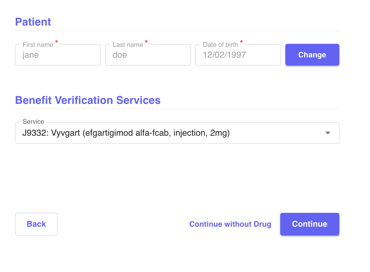
- Enter patient name, DOB, and select the Drug
- Enter the patient's first & last name, and DOB.
- Search for and select the applicable drug from the dropdown menu.
- Click Continue.
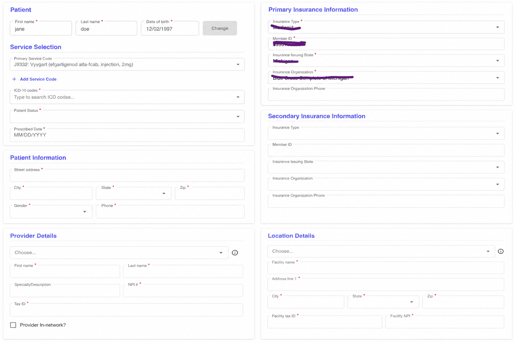
- Enter the Required Information
- Complete the required patient, insurance, provider, and location information.
- Add secondary insurance, if applicable.
- Submit
- Click Submit and confirm the submission.
- Review Results
- Return to Benefit Verifications to view the results once available.
❗️Currently, we do not have a duplicate feature for Benefits Verification.
PA Boost
PA Boost provides additional follow-up support for sponsored drugs.
Use PA Boost
- Complete the Prior Authorization
- Complete the prior authorization in SamaCare as usual.
- Complete SamaAssist, if prompted
- If SamaAssist appears, complete the required information before continuing.
- Navigate to Service Specific and select Co-pay Enrollment to enroll the patient in copay assistance.
- If the patient was previously enrolled, they will not need to be enrolled again.
- Submit the Prior Authorization
- Click Submit to submit the authorization.
- For eligible drugs, PA Boost will automatically activate. No additional action is required.
- Review Co-pay Results
- Co-pay results will be available under the Response Details along with BV results.
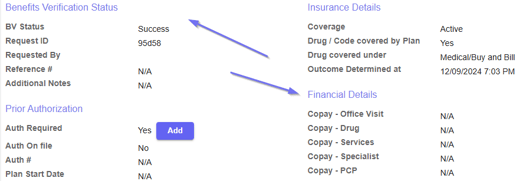
- Co-pay results will be available under the Response Details along with BV results.
- Review PA Boost Results
- Once available, PA Boost results can be viewed within the authorization in SamaCare.
💡Learn how to submit a prior authorization here!
💡Check out our FAQ for more information about Sponsored Drugs!